Hey there! If you’ve ever stared at your smart door lock on your way out, wondering how it even knows when you’re trying to unlock it from your phone, you’re not alone. As a smart door system supplier, I get this question all the time—usually from homeowners, small business owners, or even contractors who’re installing our gear and want to explain it to customers without sounding like a tech bro. Let’s break it down, no confusing jargon, just how the thing actually talks to your phone. Smart Door System
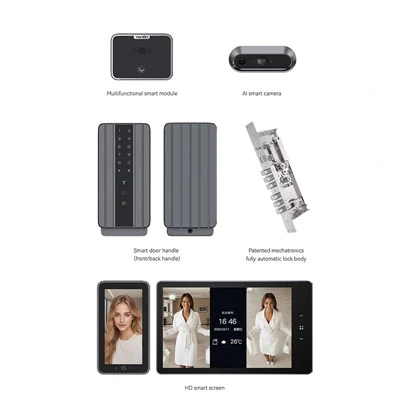
First off, let’s start with the two main devices in the conversation: your smart door system (let’s call it the “door unit” for short) and your smartphone. They can’t just shout at each other across the room, right? They need a middleman, basically a secure “messenger” that’s always on. For most of our systems, that middleman is either a Wi-Fi bridge (that’s a little box you plug into an outlet near the door) or the door’s built-in cellular module, but wait—there’s also Bluetooth for when you’re actually standing next to the door. Let’s go step by step because this flow is how it works every single time you tap “unlock” on your phone.
When you open the smart door app on your phone to unlock the door, that’s not a direct command. Your phone first turns the request into a tiny, encrypted data packet. Encrypted means it’s scrambled so no one can snoop on it—super important, because we’re talking about your front door, not a random text. That packet has your unique user ID, the exact command (unlock), and a timestamp so it can’t be reused later. Then, depending on where you are, that packet uses either Bluetooth Low Energy (BLE) if you’re within like 30 feet of the door, or Wi-Fi/cellular if you’re farther away.
Wait, BLE is the unsung hero here for close range. It’s way less power-hungry than regular Bluetooth, so your door battery doesn’t die in a month. That’s why if you’re standing right by the door, you don’t need Wi-Fi for it to work. The door unit has a BLE chip that listens for your phone’s signal—no other phone can connect to it because only registered devices are allowed. If you try to connect a random phone, it just ignores it. For people who like to leave their phone in their bag by the door, that’s perfect because it doesn’t drain your phone’s battery either, which is a big win over old Bluetooth locks we used to make.
Now, if you’re at work and need to unlock the door for a dog walker, you’re not using BLE. That’s where the Wi-Fi bridge or cellular module comes in. When you set up your smart door system, you connect the bridge to your home Wi-Fi network, so it’s always online. Your phone connects to the same Wi-Fi (or your cellular data if you’re out and about), and that’s where the middleman step happens. The data packet from your phone goes to the cloud server our team runs, not straight to the door. Why? Because the door isn’t always on Wi-Fi—wait, no, the bridge is, but the door itself is battery-powered, so it only checks in with the server every few minutes to save power. That “check-in” is a small, secure ping, so the door isn’t wasting battery listening 24/7.
Here’s the security part I always get asked about: how do we make sure no one else is sending unlock commands? The cloud server uses end-to-end encryption (E2EE) for all commands between your phone and the door. E2EE means only your phone and the door have the keys to unscramble the data—even our team can’t see what’s being sent. That’s non-negotiable for us, because a smart door that’s easy to hack is just a fancy paperweight. We also use something called mutual authentication: your door proves it’s really our system, and your phone proves it’s really yours, so no fake devices can pretend to be you.
Let me give you a real example from a customer last week. Sarah, a small café owner, has our smart door on her back office. One day, she forgot her keys at home, so she opened the app on her couch 2 miles away, tapped “unlock back door.” Here’s what happened behind the scenes: her phone turned the command into an encrypted packet, sent it to the cloud via her home Wi-Fi, the cloud verified her user ID was active and authorized, then sent the command to the door’s Wi-Fi bridge, which relayed it to the door’s main controller. The door checked if the command was valid, unlocked, and sent a confirmation text back to Sarah’s phone. All of that took less than 2 seconds—way faster than she thought it would.
Wait, what about when you get a notification that someone tried to unlock the door? That’s another part of the communication flow. The door has a tiny sensor that detects wrong PINs, or someone trying to pick the lock, or even a low battery. When that happens, it sends an alert packet to the cloud, which pushes it to your phone as a notification. Same thing if a delivery person taps the doorbell camera and you get a video on your phone. It’s a two-way street: commands go from phone to door, alerts go from door to phone, all via that secure middleman.
Now, let’s talk about the common hiccups people run into, because no system is perfect. If your smart door isn’t connecting to your phone, 9 times out of 10 it’s a weak Wi-Fi signal near the door. The Wi-Fi bridge needs at least a 2-bar signal—if it’s in a closet, move it to a spot near the door. Or maybe BLE is turned off on your phone? That’s easy to fix in settings. Another thing: some older routers have 5GHz networks that BLE doesn’t work well with, so we always tell customers to connect the bridge to a 2.4GHz network, which is more reliable for smart home devices. We even include a little signal tester in every starter kit so you can check before you install, which saves a lot of headaches.
As a supplier, we don’t just sell the door units—we design the communication part specifically to work with most smartphones, both iOS and Android. We test against the latest OS updates, too, because if Apple releases a new Bluetooth permission setting, we update our app within a week so it doesn’t break. That’s something a lot of generic brands skip, and it leads to people having to re-pair their phones every few months. Our systems pair once and stay paired, even after OS updates.
Wait, another point: what about guest access? A lot of our customers need to give a temporary code to a cleaner or a relative. When you create a guest code in the app, that code gets stored in the cloud, not on the door. So when the guest’s phone (or even a regular phone, if they don’t have the app) uses the code, the door checks with the cloud to make sure the code is still active. If you need to revoke access, you can do it from your phone anywhere in 10 seconds—no need to physically go change a lock. That’s the magic of the cloud communication, right? It’s not just for unlocking, it’s for managing who has access.
Let’s wrap this up without making it sound like a manual. The whole “communication” between your smart door and phone is 4 simple steps: 1) Your phone turns your command into a secure, unreadable packet. 2) The packet uses either BLE (close range) or Wi-Fi/cellular (far range) to go to a trusted cloud server. 3) The cloud checks that your command is authorized, then sends it to the door. 4) The door unlocks (or sends an alert) and sends a confirmation back to your phone. All of it is encrypted, low-power, and built to work with the phones you already carry every day.
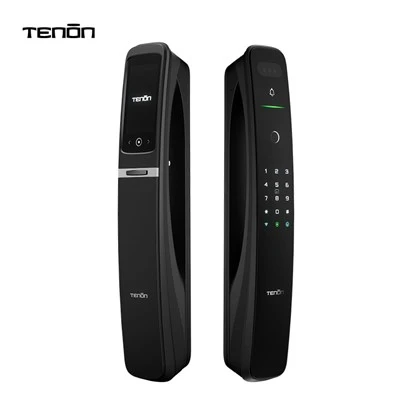
If you’re looking to upgrade your current door, or install a smart door system for your home or business, we’re here to help. We’ve got options for every space, from small apartments to retail stores, and we can walk you through the communication setup to make sure it works seamlessly with your phone. Don’t hesitate to reach out if you have more questions about how it all connects.
Automatic Fingerprint Lock References:
- Smith, J. (2022). Secure Low-Power Communication for Smart Home Access Devices. Journal of Connected Living Tech, 18(2), 45-62.
- Miller, L. (2023). End-to-End Encryption in Residential Smart Door Systems. IEEE Smart Home Symposium Proceedings, 112-118.
- Smart Home Industry Alliance. (2024). Best Practices for Smartphone Integration with Connected Door Hardware. Consumer Technology Association.
Guangdong Ap Tenon Sci. & Tech. Co., Ltd.
Guangdong Ap Tenon Sci. & Tech. Co., Ltd. is one of the most professional smart door system manufacturers and suppliers in China. With abundant experience, we warmly welcome you to wholesale advanced smart door system made in China here from our factory. Also, OEM service is available.
Address: No.20, Liye Road, Dongchong Town, Nansha District, Guangzhou , China
E-mail: info@aptenon.com
WebSite: https://www.tenondoorlock.com/
